Everything an AV rental company runs on,
built by AV rental owners.
For sound, lighting and video companies of two to fifteen people. Quote it, hold the date, book the gear, call the crew, plan the show, send the invoice and get paid, without a spreadsheet in the middle.
Try out the full software for 14 days with no card required.

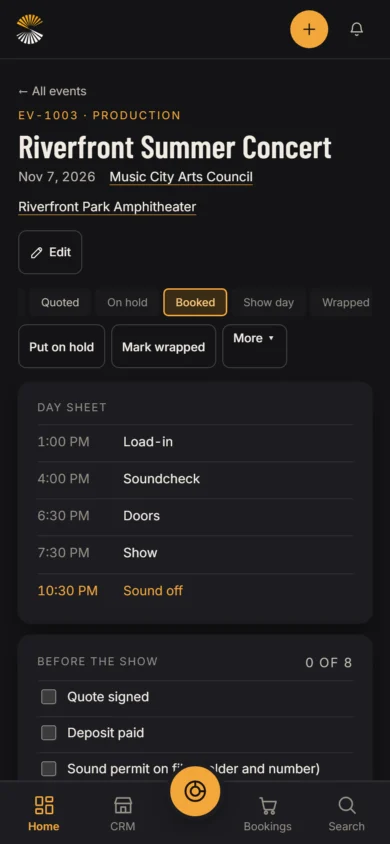
Click through it before you sign up
Real screens from a sample AV company's season.
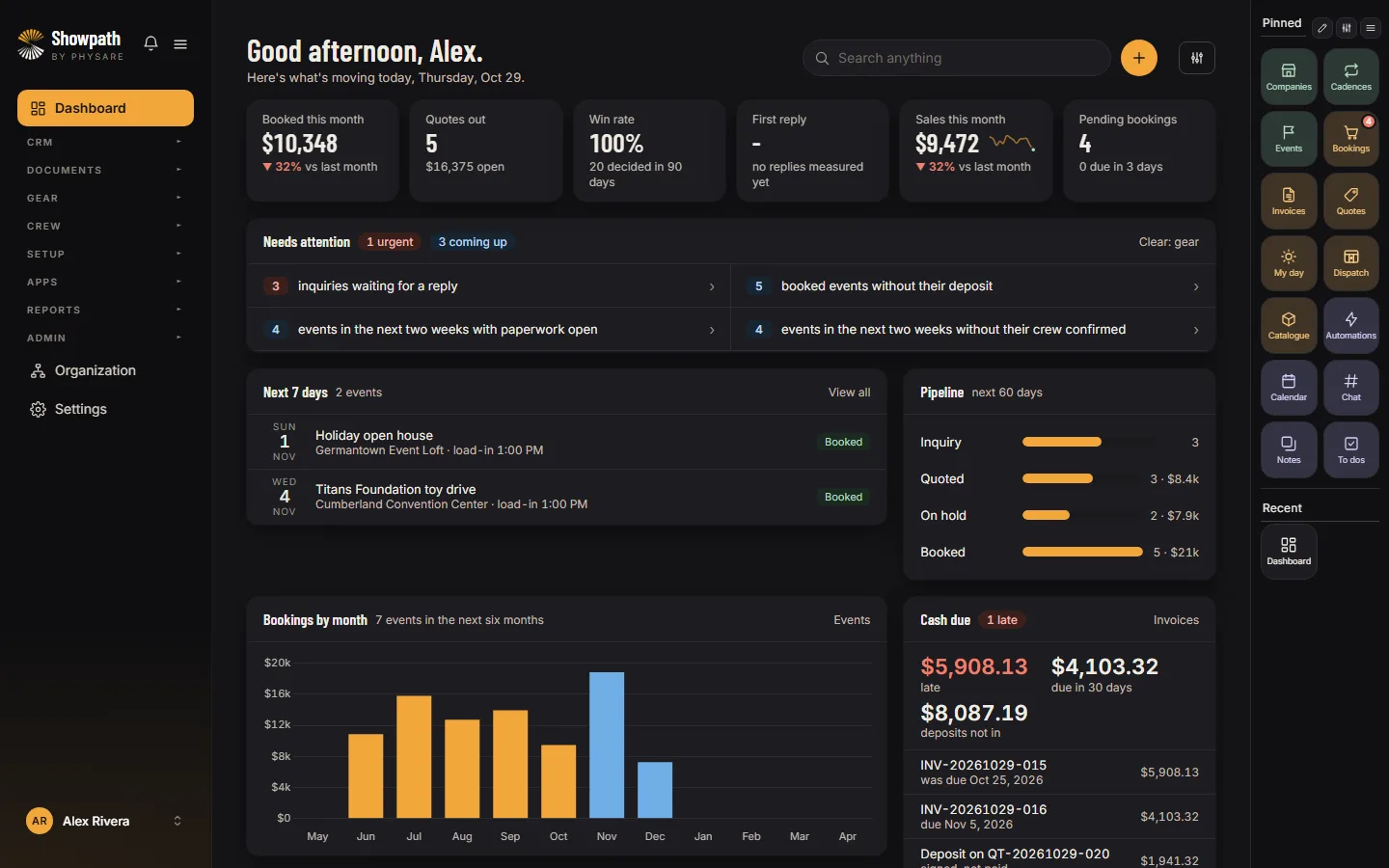
From the first call to the last payment
One show, start to finish. Step through it with the arrows.
Riverfront Summer ConcertQ1 Inquiry
The request comes in through your website's form, already typed in.
- Music City Arts CouncilFrom your request form New
- Sat, Nov 7, 2026Riverfront Park Amphitheater, outdoor
- Asked forLive audio, pro lighting, a sound engineer, delivery and setup
Riverfront Summer ConcertQ2 Quote
The client signs online and pays the deposit.
- Quote QT-20261029-002Gear, crew and services from the event $4,405.94
- Signed onlineNo login needed Signed
- Deposit on signingPaid by card, to your own Stripe $2,202.97 Paid
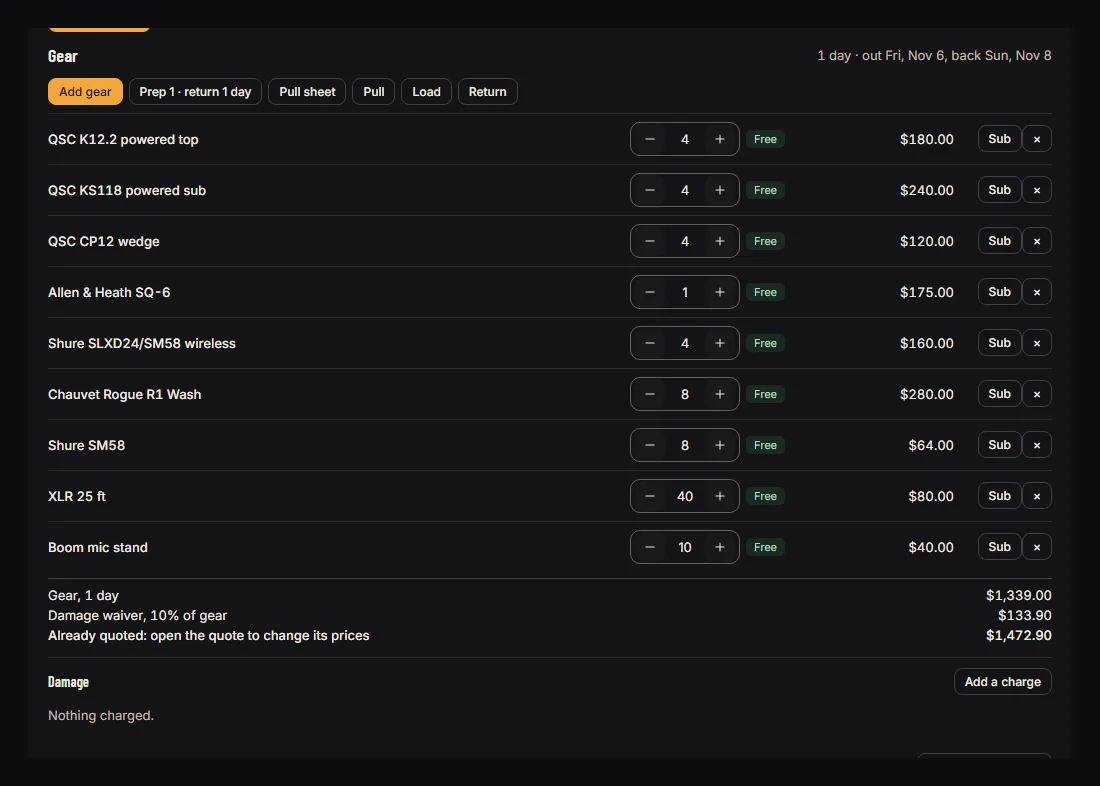
Riverfront Summer ConcertQ3 Gear
Every line checked against what is free on those dates.
- QSC K12.2 powered top4 for 1 day $180.00 Free
- QSC KS118 powered sub4 for 1 day $240.00 Free
- Allen and Heath SQ-61 for 1 day $175.00 Free
- Chauvet Rogue R1 Wash8 for 1 day $280.00 Free
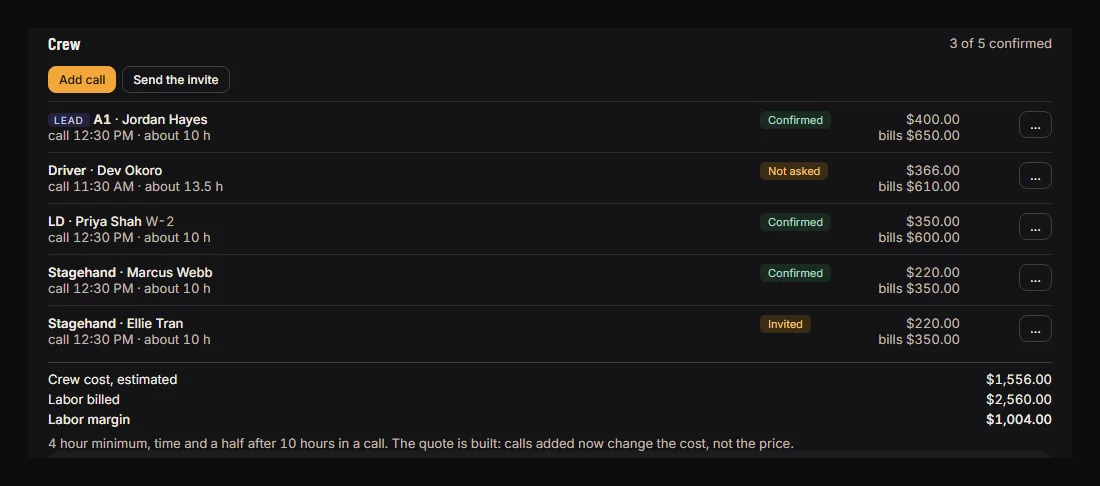
Riverfront Summer ConcertQ4 Crew
Called, confirmed and costed before load-in.
- A1, Jordan HayesCall 12:30 PM, about 10 h $400.00 Confirmed
- LD, Priya ShahCall 12:30 PM, about 10 h $350.00 Confirmed
- Stagehand, Ellie TranCall 12:30 PM, about 10 h $220.00 Invited
Riverfront Summer ConcertQ5 Show day
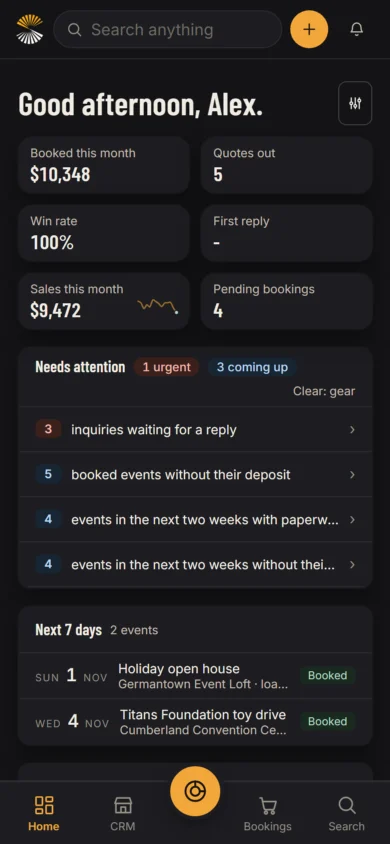
The day sheet and checklist, on the phone in the wings.
- 1:00 PMLoad-in
- 4:00 PMSoundcheck
- 7:30 PMShow
- 10:30 PMSound off Venue curfew
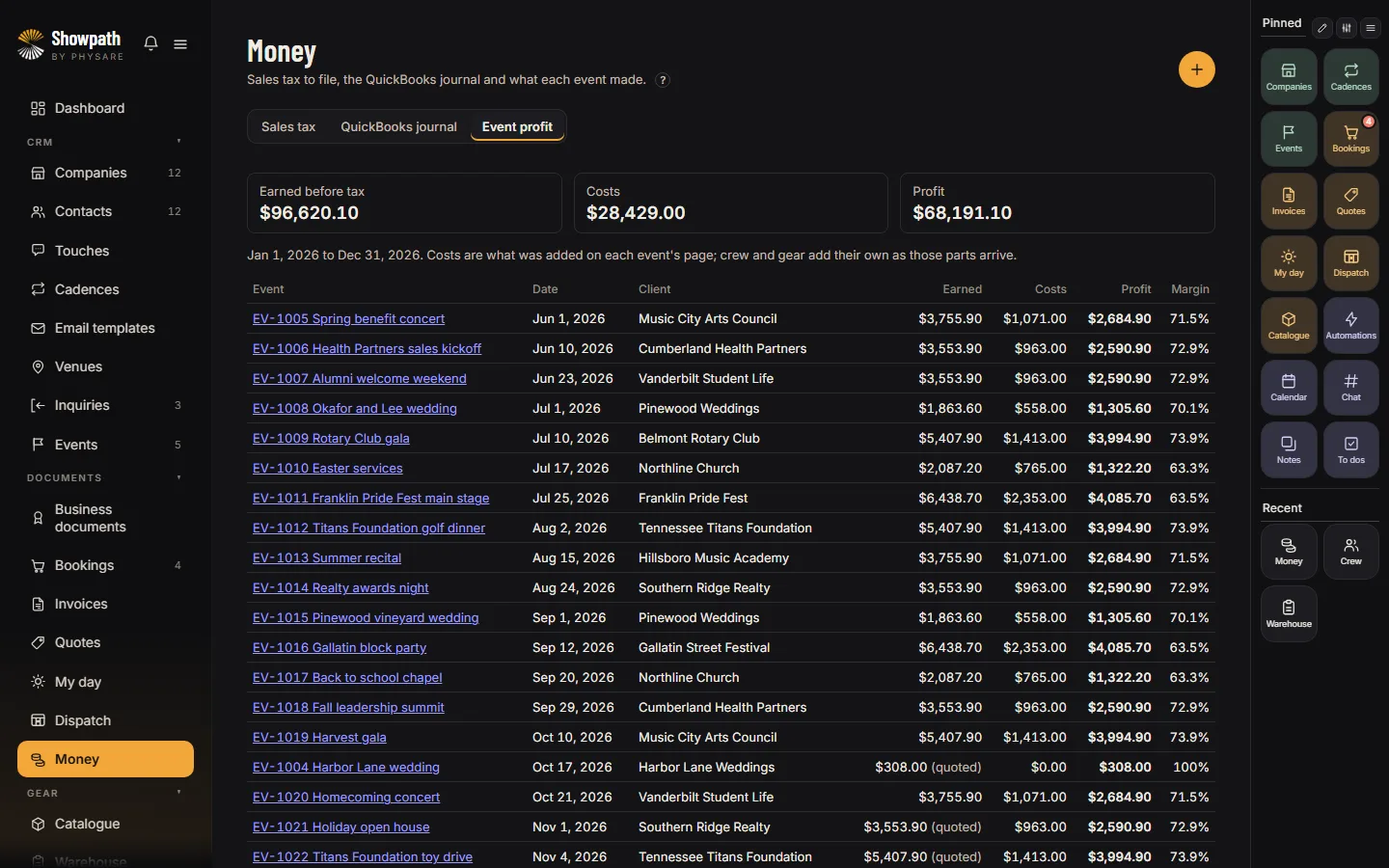
Riverfront Summer ConcertQ6 Paid
The invoice is settled, and you can see what the show made.
- Quote totalSigned Oct 29 $4,405.94
- DepositPaid on signing $2,202.97 Paid
- BalancePaid from the invoice's card link $2,202.97 Paid
“Showpath has made it much easier to track my staff, gigs, equipment and monitor their moves on set. It’s probably cut down my admin time by at least half and being able to quote on the road or at a show on my phone has probably already won me a few gigs. I highly recommend other smaller sized A/V rental companies to try Showpath for their business.”
 Cannon S. Owner, Operator at South City Sound

Made by an AV rental company
Built by Buben Sound in Nashville
Showpath was created by Buben Sound (opens in a new tab), a small audio equipment rental company in Nashville. It is made by AV rental people, for other AV rental companies.
Strong on gear, and on everything around it
Showpath follows the show from the first inquiry to the last payment, with the gear at the center of it.
Getting paid
Connect your own Stripe account for a deposit when the quote is signed, card pay links on invoices, part payments, reminders and refunds. The money goes straight to you.
US sales tax
Rates you save for each venue or area, and a question for a venue out of state. Labor, delivery and the damage waiver taxed or not, as you set them, and a report ready for the return.
Crew calls and costs
Calls sent by email and confirmed in one tap, timesheets, rates, minimums and overtime worked out, and the figures and 1099 totals for whoever runs your payroll.
Gear and kits
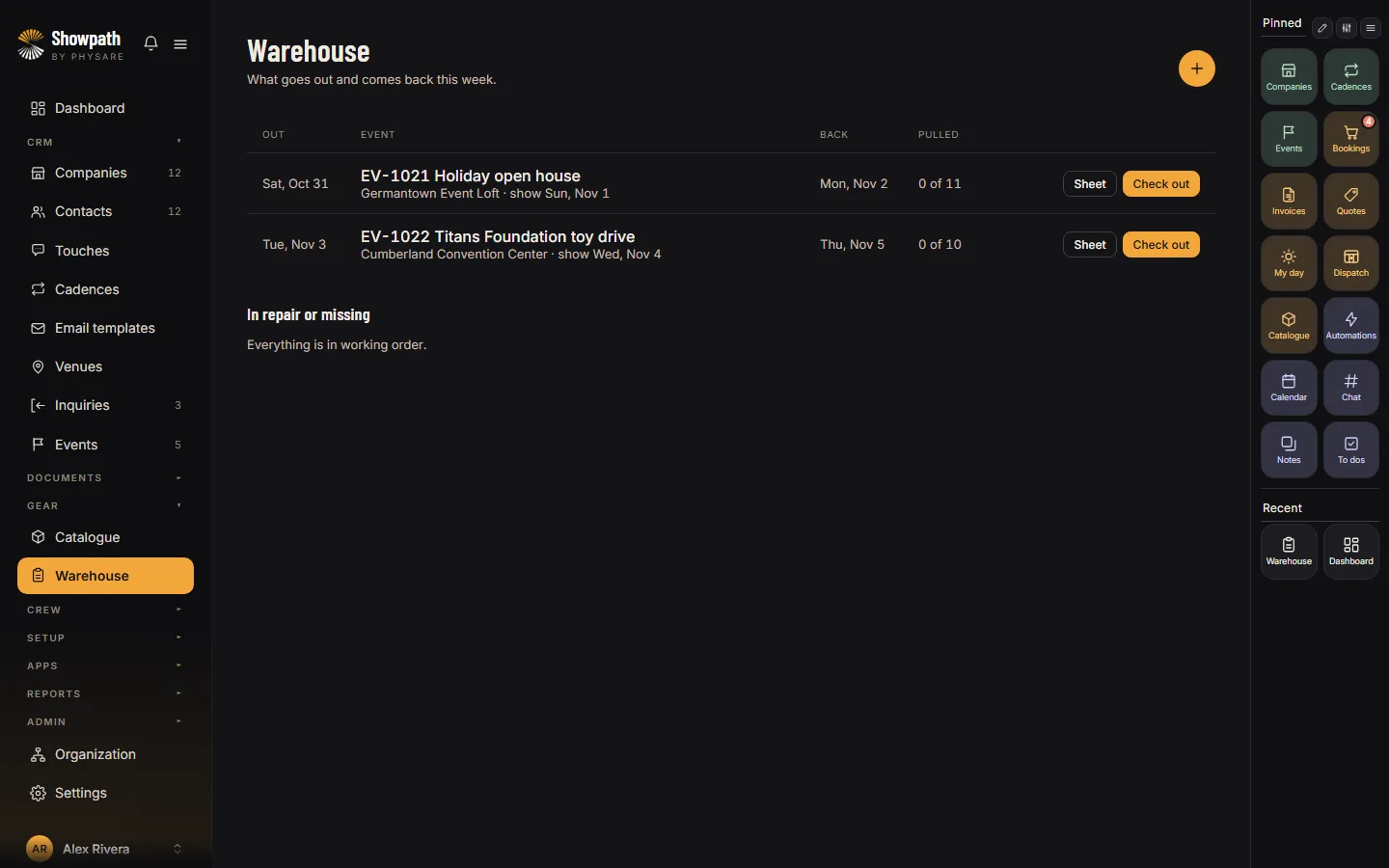
Availability for any dates, packages checked part by part so a shared cable is never double booked, QR labels and scanning out and in.
Planning the show
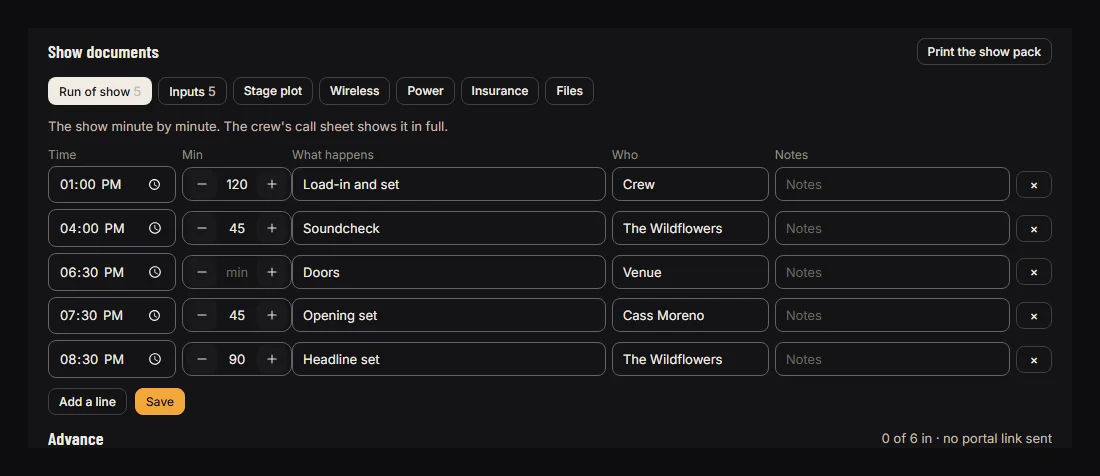
A venue library, run of show, input list, stage plot, RF frequencies and power, all on the event, with a day sheet the crew can read.
Your clients
Quotes they sign online, a portal for the advance and their changes, and certificates of insurance tracked per event.
See all 58 features, by area
Every feature on every plan, and no modules to add. Every business gets every part, and switches off what it does not use.
Sales 8
- A request form to link from your website
- Quotes from the gear and crew, signed online
- Holds and penciled dates that warn on a clash
- Deposit asked for when the quote is signed
- Damage waiver and cancellation terms on quotes built from an event
- Follow-up cadences and to dos
- Ask about next year, from last year's shows
- Clients, contacts and their history
Gear 9
- What is free for any dates
- Kits inside kits, checked part by part
- Serialized units and counted stock
- Your own categories
- QR labels, scanning out, in and on the truck
- Swaps when something is short
- Sub-rented lines with supplier, dates and cost
- Repairs, service due and damage billed
- Utilization and what each item earned
Crew 8
- Calls sent by email, confirmed in one tap
- Clashes and gaps before the show
- Certifications that warn before they lapse
- My calls on the phone, with the map
- Clock in at the venue; crew leads clock the crew
- Timesheets and approvals
- Overtime, minimums, per diem and mileage
- W-2 hours by the week and 1099 figures by tax year
The show 7
- Venue library with power, load-in and rules
- Run of show and the day sheet
- Input list and stage plot
- Wireless plan checked for spacing and intermod
- Power plan checked against 80% of each breaker
- Certificates of insurance per event
- Read the rider: a draft gear list from a tech rider
Trucks 4
- Fleet with weight ratings
- Drivers with license class and DOT card checked
- Runs and manifests from the pull sheet
- Delivery charged once on the event
Money 8
- Invoices with card and bank pay links
- Payments to your own Stripe account
- Part payments, refunds and credit notes
- Saved cards and autopay on the due date
- Reminders, late fees and statements
- Sales tax from the rate saved for each venue
- Event profit after crew and costs
- The monthly journal for your accountant
Your clients 4
- A portal for the advance and their changes
- Their own page to see what they owe and pay
- Quotes and changes signed online
- Pages they open carry your name and logo
Your team 10
- Free logins for crew and the warehouse; clients need none
- Roles and permissions, plus an org chart
- A dashboard set up for each person's role
- A calendar of entries and to dos, with a link for a phone's calendar
- Team chat, notes and to dos
- Reports, plus your own report builder
- Automations on clients, quotes and invoices: if this happens, do that
- Passkeys as a second sign-in step, and a home screen app
- Imports from spreadsheets, undone within a week if unused
- API, webhooks and a read-only MCP server for AI assistants
More on each: Gear availability, Crew scheduling, Quotes and deposits, Barcode and QR scanning, Show documents, Invoicing and payments.
Bring your business across, a step at a time
A setup that guides you
Eight short steps: what you do, your business, your work, how you run things, what you use, your team, your data, and what to do next. Each person's dashboard starts from their role.
Bring your data
Gear, clients, crew, venues and the shows still to come, from a spreadsheet. Starting column maps for some rental tools' exports, which you check before anything is saved. Undo an import within a week, unless what it brought in has been used.
Read the rider
Drop in a tech rider and Showpath drafts the gear list for you to check, then builds the quote. A PDF needs your own AI key; without one, paste the text.
Priced for the business, not each person
Some rental tools charge for every person, some sell their features in parts. Showpath is a flat price for up to 10 office logins with every feature in it. Crew and warehouse logins are free, and clients need no login at all.
Swipe the table to see the others.
| What | Showpath | Current RMS | Rentman | Booqable | Flex |
|---|---|---|---|---|---|
| Price on their website | Yes: $79 or $149 a month | Yes | Yes | Yes | No, ask for a quote |
| How you pay | A flat price for the business, up to 10 office logins | Per user: $84.50 for the first, $52.50 each after | €39 a month, plus each module per Power User | A plan by size, some add-ons per user | Not published |
| Five office logins, a month | $149 | $294.50 | Depends on the modules chosen | $87 on Grow, before add-ons | Not published |
| Crew, warehouse and clients | Crew and warehouse free and unlimited; clients need no login | Not stated | Free as basic users | Extra users set by plan (5 on Grow) | Not published |
| Barcode and QR scanning | Included | Included | €9 add-on per Power User | $12 per user a month extra | Not published |
| Every feature on every plan | Yes | Yes | No, sold as modules | No: e-signatures from Grow, extra locations on Scale | Not published |
From each company's own pricing page on October 29, 2026, at monthly billing: Current RMS (opens in a new tab), Rentman (opens in a new tab), Booqable (opens in a new tab), Flex (opens in a new tab). Prices change, so check theirs before you decide.
One at a time: Current RMS alternative, Rentman alternative, Booqable alternative, Flex alternative.
Crew costs worked out
Weekly overtime for W-2 crew worked out, not just flagged, per diem and mileage on their own lines, and 1099 totals by tax year. Nothing is withheld: the figures go to whoever runs your payroll.
The tax where the show is
Sales tax from the rate you save for each venue or area, with gear, labor, delivery and the damage waiver each taxed as you set.
Show files on the event
Run of show, input list, stage plot, wireless frequencies checked for spacing and intermod, and a power plan checked against 80% of each breaker.
Drivers checked before they go
The license class and DOT medical card you record for a driver are checked against the truck's weight before they are put on the run.
Insurance kept per event
Certificates of insurance on each event beside the venue's requirements, with a warning before a policy runs out.
Holds that speak up
Hold a date or pencil it in, and you are warned when another show wants the same gear on those days.
Every feature on every plan
You pay for the people in the office. Crew, crew leads and the warehouse sign in free, and your clients use a private link with no login.
Crew
For one or two people running the office.
- 2 office logins included
- Unlimited crew and warehouse logins
- Clients use a private link, no login needed
- Every feature, no add-ons
Production
Up to 10 office logins, then $10 a month each.
- 10 office logins included
- Unlimited crew and warehouse logins
- Clients use a private link, no login needed
- Every feature, no add-ons
Before you try it
Do I need a card for the trial?
No. You get 14 days with every feature. Choose a plan when you are ready; if you do not, nothing is charged.
Can I bring my data from another rental tool?
Mostly. Export your gear, clients, crew, venues and the shows still to come as spreadsheets and bring them in from the Import screen. There are starting column maps for some rental tools to check and adjust, and you see what every row will do before anything is saved. Past shows, invoices and payments stay in your old system.
Who holds the money my clients pay?
You do. Card payments go through your own Stripe account, straight to your bank. Showpath never holds your money.
Do my crew need a paid login?
No. Crew, crew leads and warehouse staff sign in free on every plan, and clients use a private link with no login. You pay only for office logins.
Does it run payroll?
No. It works out what each crew member earned, with overtime, minimums, per diem and mileage, and gives you the figures and 1099 totals. Nothing is withheld or paid from Showpath: you or your payroll service do that.
Does it file my sales tax?
No. It works out the tax on each invoice from the rates you save for each place, and gives you a report for the return. You or your accountant file it.
What if I cancel?
If you never choose a plan, the trial simply ends and nothing is charged. Once you pay, you cancel from the billing page under Settings. Your data stays available to export for 60 days, then it is deleted.

Try it on your next show
The setup walks you through it. If it does not earn its place, walk away; nothing is charged.
Join the waiting list